The past…
I have a long history of renting a server from Hetzner, a German hosting company. I started to rent one of their dedicated servers (model “DS 3000”) back in February 2008, and since then switched to a newer, more powerful model twice already (first to model “EQ 4” and then the current “EX 40”), so I’m on the third Hetzner dedicated server eleven years later. I’ve always been happy with their hardware reliability + performance, network connectivity and also their service during the few occasions when I needed it, e.g. when a hard disk broke, or when I needed them to attach a remote console so that I could debug some kernel / boot manager issue.
As you can see from some of my older blog entries, I’ve always ran Gentoo Linux on those servers so far. This was a lot of fun back when I wasn’t a parent and my job wasn’t that demanding. I also learned a lot. But by now it no longer feels like such a good match for me anymore: It’s not actually the building from source that bothers me, but rather the rolling release distribution type that no longer suits me. Rolling release means that every day there will be a few updates (including major version changes), and some of them mean config file updates or dependency conflicts that often result in a few minutes of tweaking and fiddling.
Switching to Ubuntu 😮
So, at the expense of no longer being able to keep my system as lean as possible (using USE flags to disable unneeded features, and therefore having less unused runtime dependencies lying around), I’ve switched to Ubuntu. There updates within one release are 99.9% painless, and switching releases happens only every two to four years. And even then, it’s typically 2-3 hours fiddling until everything works again. Ok, it also means at the end of a release life cycle I’m using software versions that are 2-4 years old with some security fixes backported, but then again, I don’t have time to play with all the bleeding edge features anymore, anyway…
Partitioning etc.
But now to the topic I actually wanted to write about in this post: My new server setup. Not only did I switch to Ubuntu, but I also switched to Hetzner’s new Cloud Server offering.
I expect to reap the following benefits with this switch:
- No more switching to newer server hardware every few years (which typically took quite a bit of work, between 3-5 days).
- No more worrying about hardware components (especially HDDs or PSUs) breaking down at inconvenient points in time. It only happened two or three times in total, but with the current server having its 4th birthday next month, it’s becoming more and more likely with every month.
- Reduction in costs by 40-50% with similar performance and storage and identical network connectivity: I’m currently sharing the server hardware with three friends, and it costs me ~18 EUR/month. With the Cloud Server I’m paying ~10 EUR/month.
Now some details on how I’ve set up the cloud VM – here is a screenshot of the cloud console’s summary:

(ignore the costs on the right, it neither includes the costs for the volumes and backups, nor tax).
The invoice section for the cloud server looks like this:
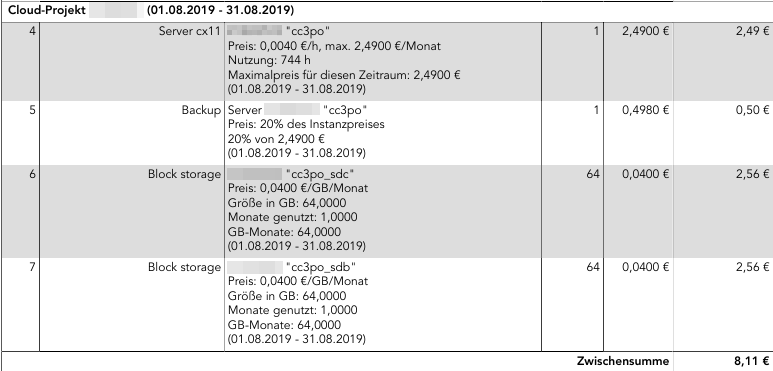
Note these numbers are also still without the 19% tax. Adding it we end up with 9.65 EUR/month total costs.
As you can see, the 2×64 GB of additional storage I booked are actually more expensive than the server VM itself. But it’s still what I would call reasonable pricing. The storage is also sufficiently fast, and Hetzner says it’s double redundant, i.e. I shouldn’t need to worry about storage downtime or that they’ll lose my data.
Now from the hardware level upwards, my setup looks like this:
I’ve picked the ubuntu-18.04.1-server-amd64.iso image that Hetzner offers. So the 20 GB local space are used for / (but with /var and /home being just mount points, and with a 2 GB swapfile in it):
Filesystem                   Size  Used Avail Use% Mounted on
/dev/sda1                     19G  6.7G   12G  38% /
Then I made the two volumes – which show up as /dev/disk/by-id/scsi-0HC_Volume_1234567 as soon as you create them via the web interface – into a LVM volume group (‘vg_data’), and in it create a logical volume (‘lv_data’). I did this so that I can add additional volumes when I run out of space.
I then formatted ‘lv_data’ with an ext4 file system. Finally I installed veracrypt and created a ‘home.hc’ and a ‘var.hc’ encrypted volume with 35 GB and 80 GB respectively, again containing ext4 file systems.
The following /etc/crypttab takes care of triggering decryption upon boot (which is when the passphrases need to be entered on the web-based console):
crypthome    /mnt/lv_data/home.hc    none       tcrypt-veracrypt
cryptvar     /mnt/lv_data/var.hc     none       tcrypt-veracrypt
The file systems from within the crypto volumes are then available as /dev/mapper/crypthome and /dev/mapper/cryptvar respectively. This /etc/fstab …
/swapfile    none                     swap    sw     0 0
/dev/vg_data/lv_data  /mnt/lv_data    ext4    discard,nofail,defaults,auto   0 0
/dev/mapper/crypthome /home           ext4    defaults  0 0
/dev/mapper/cryptvar  /var            ext4    defaults  0 0
takes care of mounting them to /home and /var:
/dev/mapper/vg_data-lv_data  126G  116G  4.1G  97% /mnt/lv_data
/dev/mapper/crypthome         35G   16G   17G  49% /home
/dev/mapper/cryptvar          79G  9.9G   65G  14% /var
The reason why I’m using these crypt volume files is mostly out of habit, and because I could also open them on a Windows box if I had to.
Everything else is straight-forward – just your usual Ubuntu server installation with a couple of services.
Backup
To make sure data doesn’t get lost, even if I screw up and delete files I didn’t want to delete, I have the following backup mechanisms in place:
For the 20 GB local storage, I use the Hetzner Backup that can be selected from the web interface – it keeps seven backup slots and creates one backup of the full local storage every 24 hours. You can also trigger a backup manually, which will cause the oldest backup to get discarded. The whole solution costs 20% of the server base price, in my case that’s 60 cents/month. If I screw something up, I can just go back 24 hours in time, which doesn’t really make a difference for /.
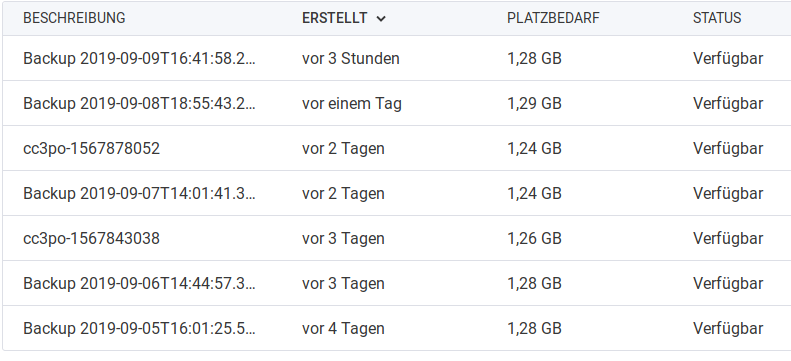
For /var and /home I do off-site backups, using my home server. I’m using rdiff-backup, because that’s what I’ve been using for many years now, and it still works very nicely. Every couple of days a script is run by cron on the home server, which uses a dedicated SSH key to access the cloud server and then does an incremental backup of both /var and /home (separately). It takes a couple of minutes (even if barely any new data has been added), which is the downside of rdiff-backup. But since it happens while I sleep, I don’t really care. The great thing about rdiff-backup is, that I can directly access the most current snapshot without needing any special tools. Only when I want to get to older versions of files, I need to use the ‘rdiff-backup’ tool and start digging.
Monitoring
That’s a missing piece of the puzzle right now. For the dedicated servers Hetzner offers a simple but reliable monitoring solution, which sends out e-mails for some events that can be defined, e.g. if pings are not returned, or if a connection to port 443 is unsuccessful. For the cloud servers they don’t seem to offer anything similar, but I’d really like to get some notification if one of the services is down (most likely reason: I screwed something up during an update and forgot to check). Preferably the notification should use some messenger (Whatsapp, Threema, … or even good old SMS) – but I don’t want to pay more than a couple of cents per month. And I also don’t want to spend hours to configure the thing. Any ideas?